

SQL for Data Analysis: The Ultimate Guide to Mastery
Introduction: Why SQL is the #1 Skill for Data Analysts
Here’s a hard truth: You cannot be an effective data analyst without SQL.
Not Python. Not Tableau. Not Power BI. SQL.
Why? Because every single dataset in the real world lives in a database. Every dashboard you’ll ever build pulls from SQL queries. Every insight you’ll present started with someone asking a question of structured data. And that question—that’s answered with SQL.
This guide isn’t about teaching you SQL syntax. You can learn that from any tutorial. This guide is about teaching you to think like a data analyst using SQL—to write queries that are fast, efficient, and actually answer business questions.
SQL for Software Development vs. SQL for Data Analysis
This distinction matters because it changes everything about how you approach the language.
| Aspect | Software Development SQL | Data Analysis SQL |
|---|---|---|
| Primary Goal | Insert/Update/Delete data reliably | Extract & analyze data insights |
| Query Focus | Small, fast queries returning 1-100 rows | Large, aggregated queries returning thousands of rows |
| Complexity | Transactions, constraints, data integrity | Joins, window functions, aggregations, subqueries |
| Optimization Focus | Data consistency & transaction speed | Query speed & result clarity |
| Most Used Commands | INSERT, UPDATE, DELETE | SELECT, JOIN, GROUP BY, WINDOW FUNCTIONS |
Software developers write SQL to manage databases. Data analysts write SQL to question them. The skills overlap, but the mindset is completely different.
If you’re completely new to SQL, check out our complete SQL learning guide which covers the foundational concepts in more detail before diving into this advanced material.
Getting Started: SQL Fundamentals for Analysts
Before you write your first query, you need to understand what you’re querying: the relational database.
Understanding Relational Databases
What is a Table?
A table is like an Excel spreadsheet. It has columns (fields) and rows (records). But unlike Excel, a database table enforces consistency—every row has the same columns, and each column holds the same type of data.
What is a Schema?
A schema is the blueprint. It defines which tables exist, what columns are in each table, and how tables relate to each other. Think of it as the DNA of your database.
What is a Relationship?
Tables connect to each other through relationships. The most common is a Foreign Key—a column in one table that references a primary key in another.
Question: “Do I really need to learn how to design databases to analyze them?”
Answer: No. But you need to understand how they’re designed. You don’t need to create tables or set constraints. You just need to know that relationships exist and how to exploit them with JOINs.
The Core Query Structure
Every SQL query follows the same basic structure:
The order matters. SQL executes in this order, not the order you write:
- FROM – Which table?
- WHERE – Which rows?
- GROUP BY – How to group?
- HAVING – Filter groups?
- SELECT – What columns?
- ORDER BY – Sort how?
- LIMIT – How many?
Real Example: Finding Our Best Customers
What this query does:
- Finds all orders from 2023 or later
- Groups them by customer
- Filters to customers with at least 5 orders
- Calculates total spent and average order value
- Sorts by highest spenders first
- Shows only the top 10
Notice we used WHERE (filters before grouping) and HAVING (filters after grouping). This is the difference between filtering individual rows and filtering aggregated results.
Want to accelerate your SQL learning? Check out our SQL tips for beginners guide which contains practical shortcuts and best practices to write better queries faster.
Advanced Analysis Techniques: Where Data Analysts Shine
Mastering Joins: INNER, LEFT, RIGHT, and FULL
Joins are the superpower of SQL. They let you combine data from multiple tables. Most junior analysts know 1-2 joins. The best ones master all four.
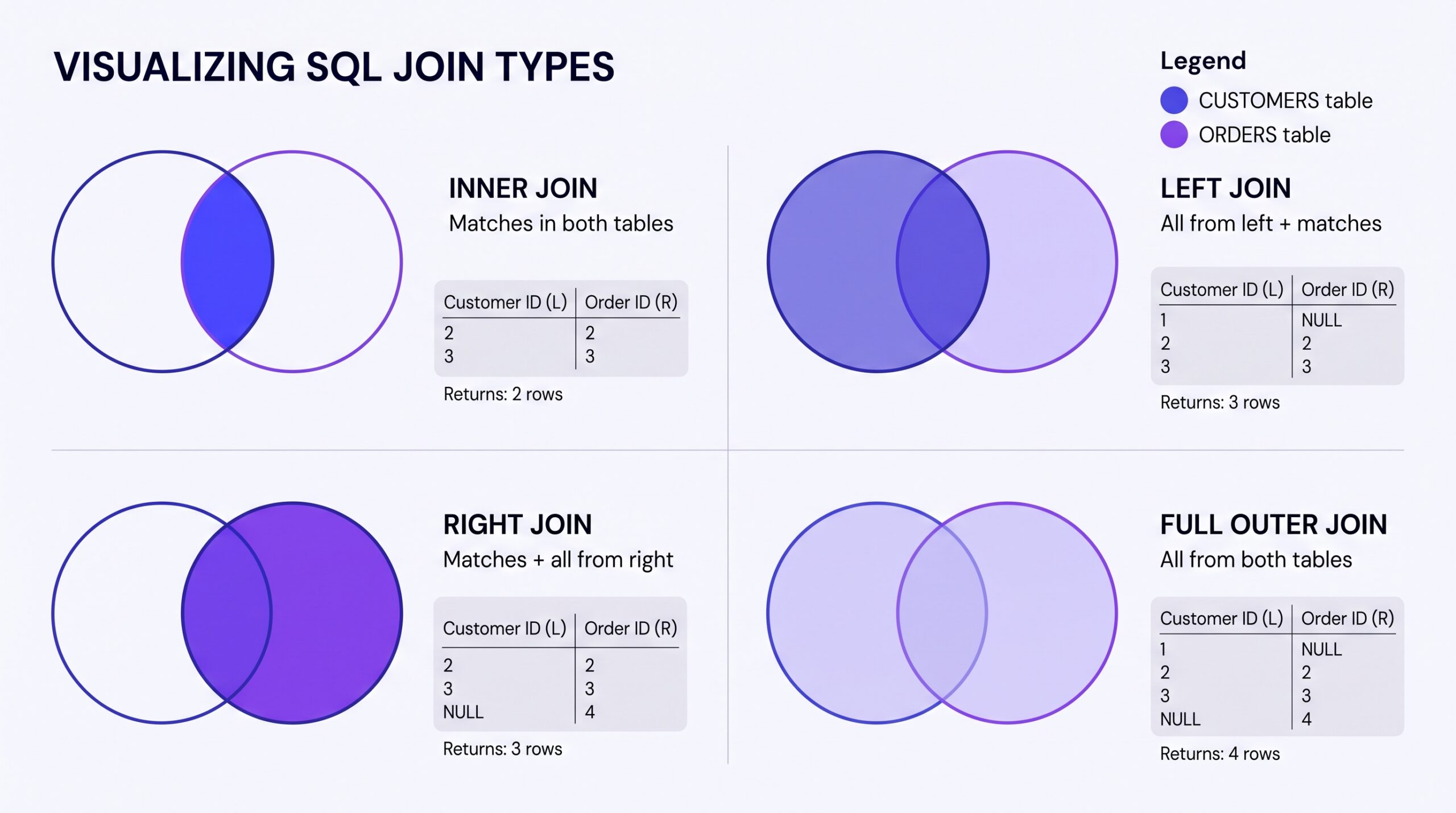
INNER JOIN: Only Matching Rows Beginner
Returns only rows that have matches in both tables.
When to use: When you only care about records that exist in both tables (customers who’ve ordered, products that have been sold, etc.)
LEFT JOIN: All from Left, Matches from Right Intermediate
Returns all rows from the left table, plus matching rows from the right table. Non-matches show as NULL.
When to use: When you want all records from the left table regardless of matches (all customers, all products, all employees).
RIGHT JOIN & FULL OUTER JOIN Advanced
Right JOIN is the reverse of LEFT. FULL OUTER returns all rows from both tables.
Pro tip: Most SQL databases don’t support RIGHT or FULL OUTER. Just flip your LEFT JOIN around instead.
Window Functions: The Secret Weapon Advanced
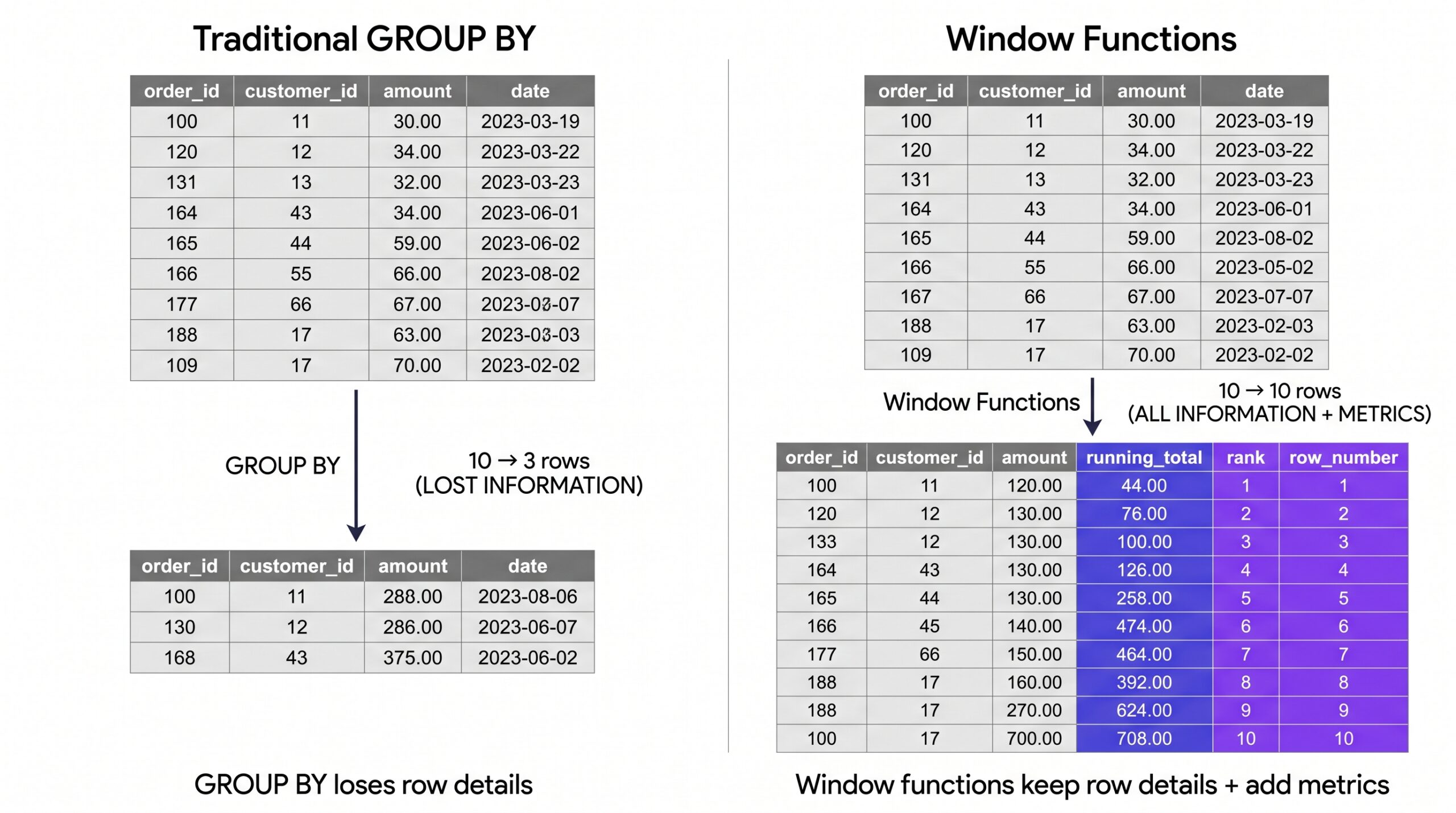
Window functions are what separates junior analysts from ones who solve complex problems. They let you calculate metrics without collapsing your data with GROUP BY.
The Game-Changing Difference
Traditional GROUP BY: Collapses rows. You lose detail.
Window Functions: Adds metrics to every row. You keep detail.
Essential Window Functions for Analysts
RANK() & ROW_NUMBER() – Find top performers, detect duplicates
LEAD() & LAG() – Compare current row to previous/next row
Running SUM/AVG – Calculate cumulative totals
Master RANK(), ROW_NUMBER(), and LEAD()/LAG(). These three window functions solve 80% of real-world analysis problems. Everything else is icing.
Subqueries vs. CTEs: Which to Use and When? Intermediate
Both let you use the results of one query as input to another. But they’re different tools for different jobs.
Subqueries: Quick, Inline Solutions
When to use: Simple, one-off queries. Single level of nesting.
Common Table Expressions (CTEs): Readable, Reusable
When to use: Complex queries with multiple steps. Makes code easier to read and debug.
| Factor | Subquery | CTE |
|---|---|---|
| Readability | Hard (nested parentheses) | Easy (named blocks) |
| Reusability | One-time use | Can reference multiple times |
| Performance | Similar | Similar (databases optimize both) |
| Best For | Simple, single-level queries | Complex, multi-step analysis |
Q: “How do I clean messy data using only SQL?”
A: With CTEs and string functions. Use TRIM(), UPPER(), CASE statements, and NULL checks to clean data before analysis. It’s cleaner (literally) to clean in SQL than in Excel, because your transformation is reproducible and automated. See the Resource section for cleanup techniques.
SQL Query Optimization: Writing Fast, Efficient Queries
The Performance Problem: Why Some Queries Feel Slow
You write a query. It works. But it takes 30 seconds. Then someone asks for a slightly different result. Now it takes 2 minutes. This is where most analysts get stuck.
Here’s what separates average queries from optimized ones:
Common “Slow” Query Patterns to Avoid
❌ Don’t: Filtering on a function result
❌ Don’t: SELECT * when you need specific columns
❌ Don’t: Subqueries in SELECT for large datasets
Understanding Indexes: The Speed Multiplier
An index is like a book’s index. Instead of reading every page to find mentions of “customer”, you look in the index, which has them pre-organized.
Where indexes exist (you can’t control this, but good to know):
- Primary Keys – Always indexed. Fastest lookups.
- Foreign Keys – Usually indexed (but not always).
- High-selectivity columns – Columns where most values are unique (IDs, emails).
How to write queries that use indexes:
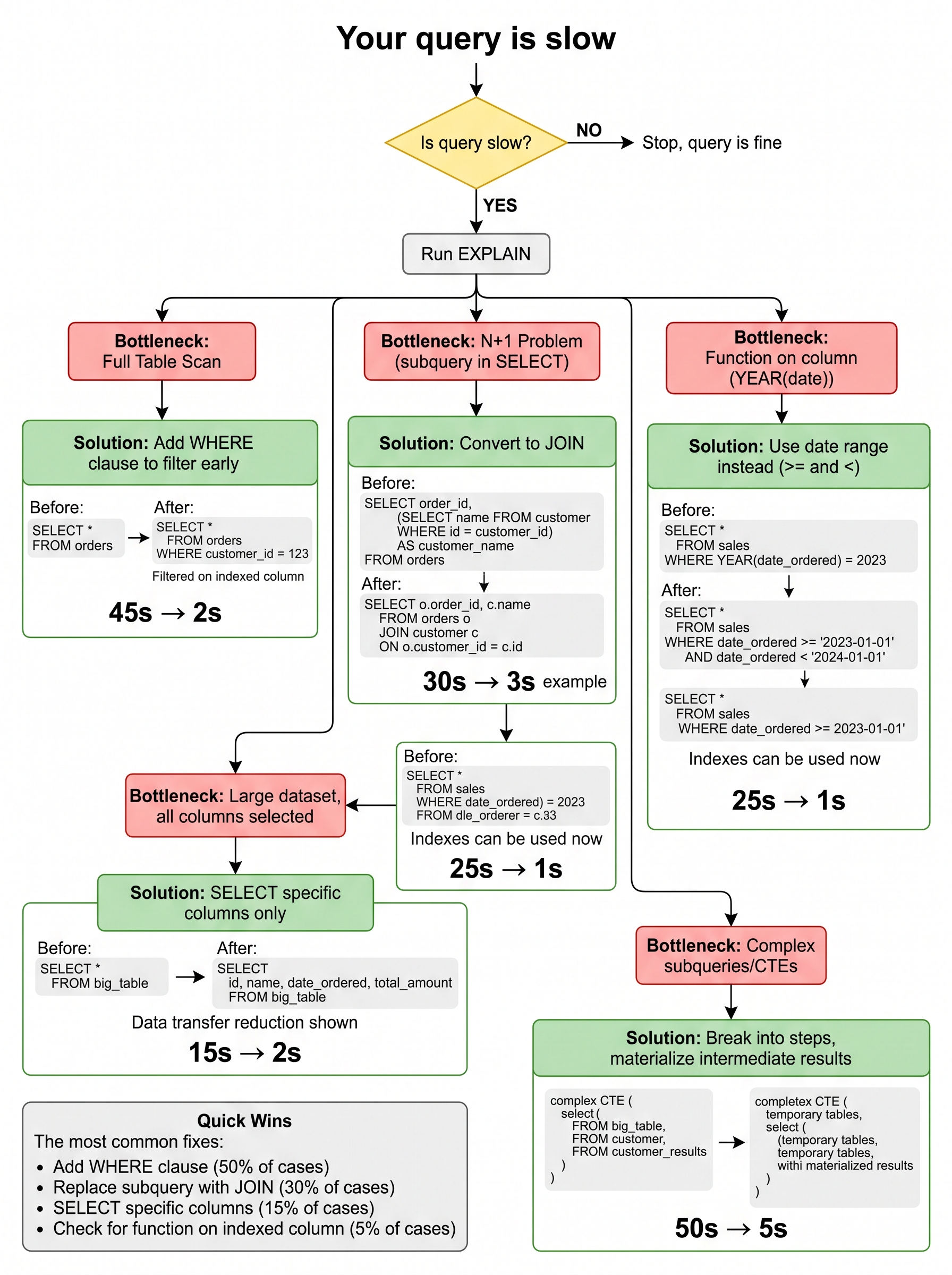
The Real-World Optimization Workflow
Step 1: Write the query correctly first – Don’t optimize prematurely.
Step 2: Run it and check execution time – Is it actually slow?
Step 3: Use EXPLAIN to see the plan – What’s taking time?
Step 4: Fix the bottleneck – Add WHERE clause, use JOIN instead of subquery, etc.
Q: “When should I move from SQL to Python?”
A: When SQL can’t do what you need efficiently. SQL excels at: filtering, aggregating, joining. Python excels at: complex transformations, machine learning, statistical testing. Use SQL to get 80% of the way there, then Python for the remaining 20% if needed. In most jobs, 95% of your work stays in SQL.
Advanced SQL Patterns That Solve Real Problems
Detecting Duplicates & Data Quality Issues
Cohort Analysis: Comparing Customer Groups
Cohort analysis groups customers by signup month, then tracks their behavior over time.
Calculating Metrics Like Churn & Retention
Common Questions: Mastering SQL in Practice
Q: What is the biggest difference between learning SQL and using it at work?
A: Learning SQL, you write perfect queries from scratch. At work, you inherit broken queries and need to debug them. You spend 70% of your time understanding someone else’s code, 30% writing new code.
The skill that matters: Reading others’ queries quickly and fixing them. Take existing queries apart. Understand every JOIN. See if there’s a bug. This is how you actually learn fast at a job.
To avoid costly mistakes early, read our guide on common SQL mistakes every beginner makes and how to avoid them.
Q: How do I practice SQL query optimization for interviews?
A: Use HackerRank SQL challenges or LeetCode database problems. They show execution time. Write a solution, optimize it, see if the optimization helped.
Practice pattern:
- Write working query
- Check execution time
- Rewrite with different approach
- Compare times
- Understand why one was faster
Q: SQL vs. Python: When to use which for Data Analysis?
A: Use SQL for getting data. Use Python for understanding data.
| Task | SQL | Python |
|---|---|---|
| Filter & aggregate data | ✅ Excellent | ⚠️ Overkill |
| Join multiple tables | ✅ Built for this | ⚠️ Requires more code |
| Statistical analysis | ❌ Limited | ✅ Excellent (pandas, scipy) |
| Machine learning | ❌ Not possible | ✅ Excellent (scikit-learn) |
| Data cleaning | ✅ String functions work well | ✅ More flexible with pandas |
| Visualization | ❌ Not designed for it | ✅ Excellent (matplotlib, seaborn) |
Rule of thumb: If you’re querying a database, use SQL. If you’re manipulating results or building models, use Python.
Q: What are the most important window functions to master?
Master these 4 in this order:
- ROW_NUMBER() – Rank rows, find top N per group
- LAG() & LEAD() – Compare row to previous/next
- SUM() OVER – Running totals
- RANK() – Handle ties explicitly
Everything else is nice-to-have. These four solve 90% of real problems.
Resources: Where to Learn & Practice SQL
SQL learning has three components: understanding syntax, understanding patterns, and understanding databases. Here are the best resources for each.
🎯 Practice Platforms
Maven Analytics Data Playground
Best for: Real datasets with business context. Actually fun.
What you get: Real-world datasets ready to query. SQL editor built in. Clear problem statements.
Cost: Free to start, premium content available
LeetCode Database Problems
Best for: Interview preparation. Problem-solving practice.
What you get: 200+ SQL problems from easy to hard. Solutions and discussion. Execution time feedback.
Cost: Free tier covers most problems
HackerRank SQL Challenge
Best for: Building confidence with fundamentals. Good progression from easy to hard.
What you get: 70+ problems, instant feedback, community solutions
Cost: Completely free
📚 Learning Resources
Mode Analytics SQL Tutorial
Best for: Understanding SQL concepts interactively. Excellent explanations.
What you get: Free SQL course with a real database to query. Clear, progressive lessons.
Cost: Free
Window Functions Documentation
Best for: Reference when building complex queries. Database-specific syntax.
Database-specific links:
Cost: Free (official docs)
🏆 Advanced Reading
“Use The Index, Luke!” – Database Indexing Guide
Best for: Understanding how databases actually work under the hood
Reddit Communities for Help
Best for: Getting help when you’re stuck
- r/SQL – 100k+ members, very helpful
- r/dataanalysis – Career and skills questions
- r/learnprogramming – General programming help
Cost: Free
Conclusion: Your Path to SQL Mastery
Here’s what separates average SQL analysts from great ones:
Average: Knows SELECT, WHERE, GROUP BY. Writes queries that work.
Great: Understands why queries work. Writes queries that are fast, readable, and maintainable.
You now have the knowledge. The only step left is to practice.
Your 30-Day SQL Mastery Plan
Week 1: Master the core query structure. Complete 10 problems on Maven Analytics focusing on SELECT, WHERE, GROUP BY, HAVING.
Week 2: Master JOINs. Build queries combining 2-3 tables. Complete INNER JOIN and LEFT JOIN problems.
Week 3: Learn Window Functions. Write 5 queries using ROW_NUMBER(), LAG(), and SUM() OVER().
Week 4: Optimize & Debug. Take your previous queries, use EXPLAIN, find the slow one, optimize it, compare times.
That’s it. One month. Deliberate practice. You’ll be dangerous.
Level Up Your SQL Skills
SQL mastery doesn’t happen in tutorials. It happens when you build real projects with real data.
Join The Lab Newsletter and get SQL challenges delivered to your inbox every week. Real problems, real solutions, real learning.
Plus: Early access to our SQL project walkthroughs and optimization tips.
Subscribe to The Lab →